Converting varchar values to datetime with nonbreaking spaces
I was tasked with importing a csv from into SQL Server. The CSV included 40 date fields which included values that could not be converted to datetime (eg. 12-Dec, 2011, and 23 Jan 2012). I’ll explain why 23 Jan 2012 could not be converted later on. I wanted to do this quickly so I used the SSMS import wizard, included headers and imported the date values into a varchar column.
After converting the values I started looking into which values could not be converted using the following query:
SELECT *
FROM myTable
WHERE ISDATE(myDateField1) = 0
I repeated this for all of the fields until I resolved all issues. The first issue I ran into was:
Msg 241, Level 16, State 1, Line 1
Conversion failed when converting date and/or time from character string.
I isolated this down to values that included 23 Jan 2012. I could not see at first why this was causing a conversion failure. After further research I found that the first space (between 23 and Jan) was actually a nonbreaking space which used ascii code 160 instead of an ASCII space which is ascii code 32. To resolve this I used the following replace command before converting:
SELECT CONVERT(datetime,REPLACE(myTable.myDateField1,char(160),' ')) as myDateField1
FROM myTable
WHERE ISDATE(myDateField1) = 0
The other issues were resolved by applying a case statement to myTable.myDateFields, evaluating the length of the value then appending the appropriate values to make the value submitted a valid date. Eg. if the length was <5 it would apply len(myDateField1) < 5 then '1-1-'+myDateField1.
Next I needed to apply the changes to all of the date fields. Since all of the date fields had the same issues as the date field I evaluated I simply apply the same convert/replace/case satement to every date field.
I created a quick recording of the key commands I needed to repeat and ran the following macro 40 times. After that I tested the script and was done!
Here is the Macro I used:
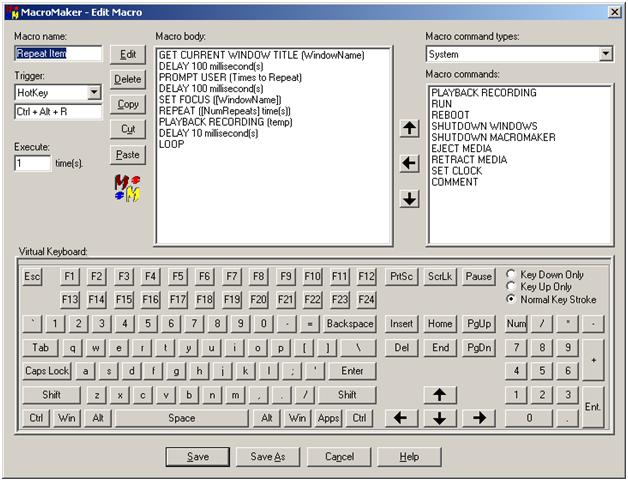
In the macro edit screen, the Prompt User “Times to Repeat” asks me how many times I want to repeat/playback a recording durring runtime and loads it into a variable named NumRepeats. I set the playback to run at 1500% the actual speed of the recording.
